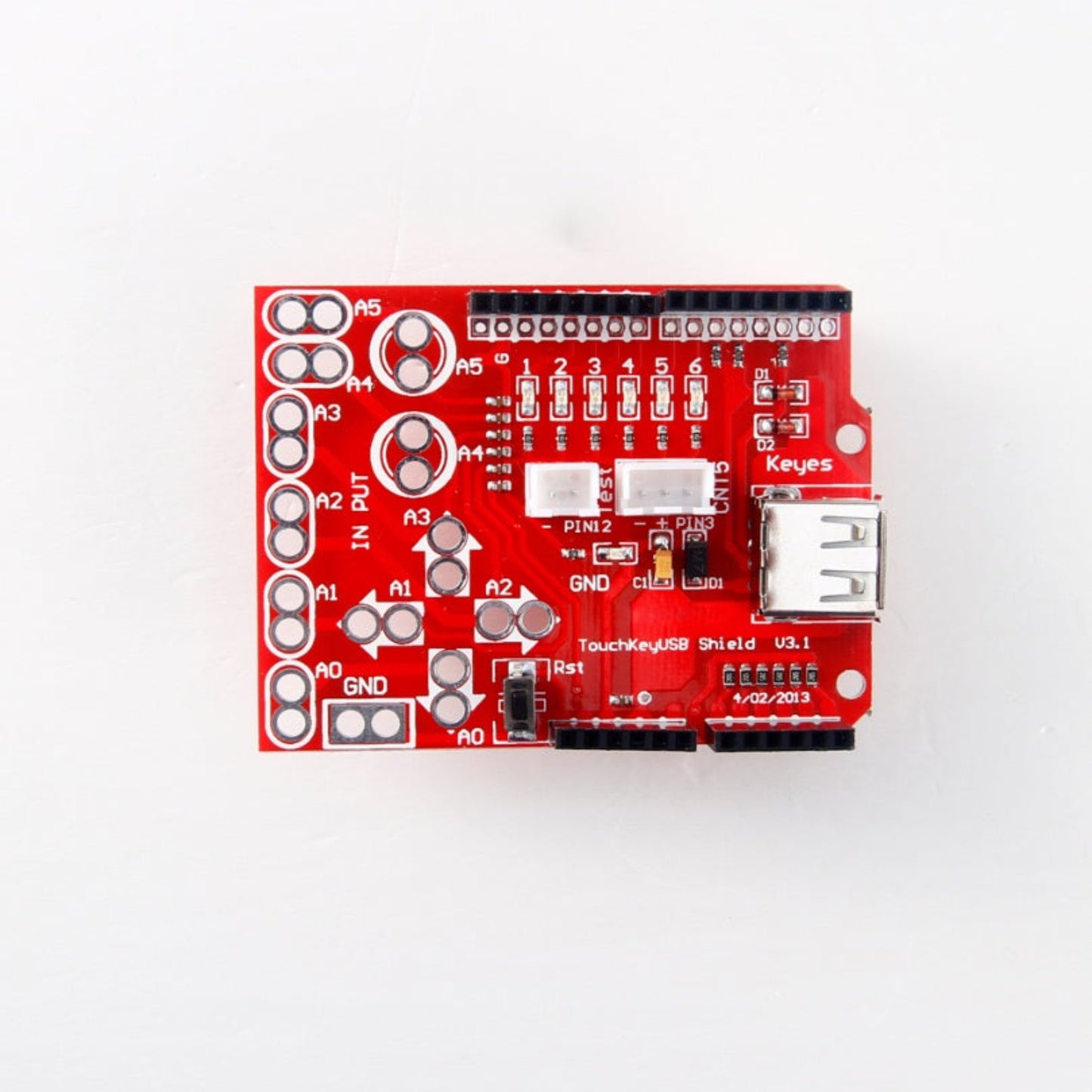


Makey Makey Compatible Touch Keypad USB Shield for Arduino Uno
Makey Makey Compatible Touch Keypad USB Shield for Arduino Uno
Couldn't load pickup availability
Short Product Description
Short Product Description
Turn everyday objects into interactive computer keys with the Makey Makey Compatible Touch Keypad USB Shield. Designed to mount directly onto an Arduino Uno, this 20.2g expansion board uses 6 alligator clip inputs to transform conductive items—like fruits, playdough, or pencil drawings—into a virtual keyboard. It is the perfect hands-on STEM education tool for teaching kids coding and circuitry. Need help starting your first interactive DIY project? Sun Cheong Computer Co. Ltd. (新昌電腦有限公司) has over 20 years of electronic component expertise. Visit our Sham Shui Po physical store for instant pickup and expert technical advice!
Key Features
Key Features
- Makey Makey Functionality: Transforms any conductive object, liquid, or fruit into a functional computer keyboard or mouse input.
- Direct Arduino Mounting: Snaps perfectly onto an Arduino Uno board, eliminating the need for complex wiring or soldering.
- 6 Dedicated Inputs: Features easily accessible connection points designed specifically for standard alligator clips.
- Visual LED Feedback: Each of the 6 inputs is equipped with an LED indicator that lights up to confirm a successful touch signal.
- Compact & Lightweight: Measures just 6.3cm x 5.2cm x 2cm and weighs 20.2g, making it ideal for portable school projects.
- Instant Store Pickup: Don't wait for shipping when your STEM class is tomorrow; grab your shields instantly at our Sham Shui Po location.
Full Product Description
Full Product Description
Interactive STEM Learning with the Touch Keypad USB Shield
The Makey Makey Compatible Touch Keypad USB Shield bridges the gap between the physical world and digital programming. Traditional coding can be abstract for beginners, but this expansion board makes learning highly interactive by allowing you to control computer programs using everyday conductive objects. Whether you are a STEM educator building a "banana piano" or a hobbyist creating a custom game controller, this shield provides a fun, intuitive gateway into the world of Arduino electronics.
Turn Everyday Objects into Keyboards
The Touch Keypad USB Shield allows you to virtually use any conductive surface, object, or even fruit as an input medium. By connecting alligator clips to the board's 6 input pins, you can map physical touches to specific keyboard strokes or mouse clicks. You are only limited by your imagination—visualize playing a video game using cups of water or triggering sound effects by high-fiving a friend. Each input features a dedicated LED indicator, providing instant visual feedback whenever a touch signal is successfully registered.
Plug-and-Play Arduino Uno Compatibility
The Makey Makey Compatible Touch Keypad USB Shield is designed for effortless installation. It mounts directly onto your existing Arduino Uno board without the need for messy breadboards or complex soldering. The clearly labeled pins and integrated USB interface streamline the hardware setup, allowing students and makers to focus entirely on writing their code and designing their interactive interfaces.
💡 Pro Tip from Our Technicians
"When using the Touch Keypad USB Shield for the first time, many beginners forget that the human body must complete the electrical circuit! Always ensure that one alligator clip is connected to the GND (Ground) pin on the shield, and the user must hold the other end of that ground wire while touching the fruits or objects. If your inputs are not registering, your hands or the objects might be too dry—try lightly moistening your fingers! If you are building a STEM project and need compatible alligator clips or an Arduino Uno, drop by our Sham Shui Po store! Our team at Sun Cheong Computer Co. Ltd. loves helping educators and students debug their interactive circuits."
Technical Specifications
Technical Specifications
- Product Type: Touch Keypad USB Expansion Shield
- Compatibility: Mounts directly onto Arduino Uno
- Input Channels: 6x Touch-sensitive inputs
- Connection Method: Designed for alligator clips
- Visual Indicators: Individual LED status lights for each input
- Dimensions: 6.3cm x 5.2cm x 2cm
- Weight: 20.2g
- Applications: STEM education, interactive art, custom game controllers
Delivery Options
Delivery Options
- Local delivery within Hong Kong and in-store pickup.
- Free shipping for orders of HK$400 or above; HK$35 shipping fee for orders below HK$400.
- Shipped by SF Express, usually dispatched the same day for orders confirmed before 6:00 PM (Mon–Sat).
- Estimated delivery time: 1–3 business days after dispatch (Hong Kong).
- In-store pickup details (location and time) will be confirmed by email or phone message.
- Delivery times are estimates and may be affected by weather or unforeseen circumstances.
FAQ Section
FAQ Section
- Does the Touch Keypad USB Shield work with any Arduino board?The Touch Keypad USB Shield is specifically designed with a pin layout that mounts directly onto the standard Arduino Uno. While the underlying technology can theoretically be wired to other microcontrollers, it is physically shaped to be a plug-and-play "shield" exclusively for the Uno form factor.
- Is this shield different from an original Makey Makey board?Yes, the Touch Keypad USB Shield acts as an expansion module that requires an underlying Arduino Uno to function, whereas an original Makey Makey is a standalone board. This shield offers a more cost-effective way to achieve Makey Makey functionality if you already own or are learning to program an Arduino Uno.
- How do I connect fruits to the Touch Keypad USB Shield?You connect fruits to the Touch Keypad USB Shield using standard alligator clips. Clip one end of the wire to the input pin on the shield, and gently pierce the other end of the clip into the fruit (like a banana or apple). Remember to also hold a ground wire connected to the shield's GND pin to complete the circuit.
- Can I buy the alligator clips and Arduino Uno at your Sham Shui Po store?Absolutely! Sun Cheong Computer Co. Ltd. keeps a massive inventory of STEM education kits, Arduino boards, and electronic accessories like alligator clips at our Sham Shui Po physical store. You can pick up everything you need for your interactive project in one visit.
- What materials work best as touch inputs for this shield?The Touch Keypad USB Shield works best with materials that have high moisture or conductive properties. Excellent choices include fruits, vegetables, playdough, aluminum foil, copper tape, pencil graphite (heavy drawings on paper), and even cups of water.
Target Users / Applications
Target Users / Applications
- STEM Educators & Teachers: Creating engaging classroom activities where students build "fruit pianos" or interactive cardboard posters to learn basic circuitry.
- Parents & Kids: Spending quality weekend time building custom, physical video game controllers out of playdough or aluminum foil.
- Interactive Art Creators: Designing museum or exhibition installations where visitors trigger audio or visual effects by touching conductive sculptures.