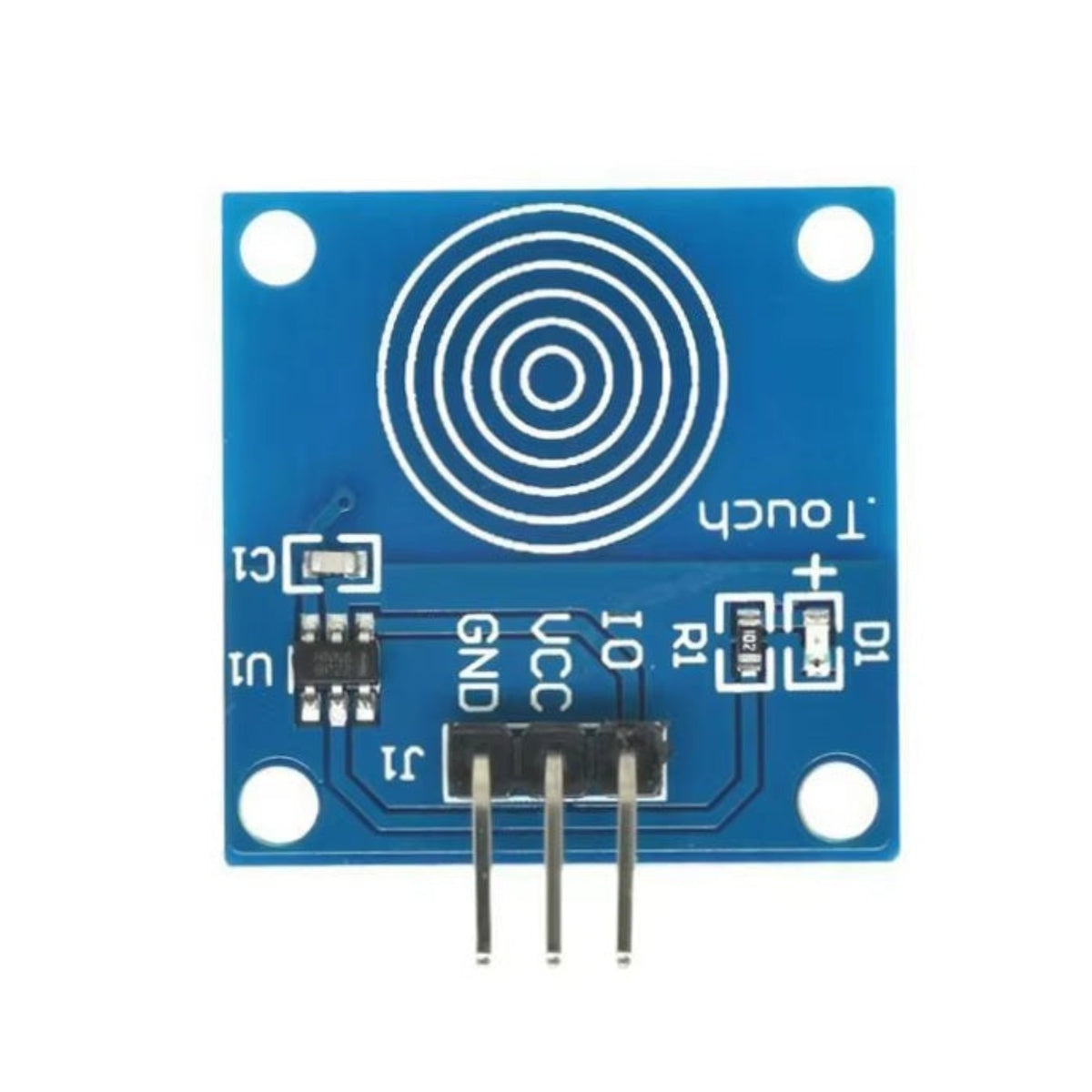


TTP223B Capacitive Touch Sensor Module | 1-Channel Digital Switch
TTP223B Capacitive Touch Sensor Module | 1-Channel Digital Switch
Couldn't load pickup availability
Short Product Description
Short Product Description
The TTP223B Capacitive Touch Sensor Module is a 1-channel digital switch that replaces traditional mechanical buttons. Operating on 2V to 5.5V DC, it outputs a high-level signal when touched and returns to a low-level state when released (jog/momentary mode). Capable of detecting touches through non-metallic surfaces like plastic, glass, or paper, it is perfect for creating hidden buttons in smart home DIY projects and Arduino prototypes. Available in-stock at Sun Cheong Computer Co. Ltd. (新昌電腦有限公司).
Key Features
Key Features
- Jog/Momentary Action: Functions exactly like a traditional push-button (High when touched, Low when released).
- Through-Material Sensing: Can detect touches through thin non-metallic surfaces like plastic, glass, and paper for hidden installations.
- Low Power Consumption: Automatically enters a power-saving mode after 12 seconds of inactivity, ideal for battery-operated devices.
- Dual-Sided Touch: Both the front and back of the PCB can be used as the touch-sensitive surface.
- Visual Feedback: Features an onboard green LED that lights up to indicate a successful touch registration.
- Easy Mounting: Includes four M2 screw positioning holes for secure and precise installation in your project enclosures.
Full Product Description
Full Product Description
Modernize Your Projects with Capacitive Touch
Upgrade your electronics projects by replacing clunky mechanical push-buttons with the sleek, solid-state TTP223B Capacitive Touch Sensor Module. This module operates in a "jog" (momentary) mode: it outputs a low-level signal by default, switches to a high-level signal when your finger touches the sensor area, and immediately returns to a low-level state when you remove your finger. An onboard green LED provides instant visual feedback, illuminating whenever a touch is registered.
Create Hidden "Magic" Switches
One of the most powerful features of capacitive touch technology is its ability to detect proximity through non-metallic materials. You can mount this module behind thin layers of plastic, acrylic, glass, or even paper. As long as the user touches the correct spot on the surface, the sensor will trigger. This allows you to create seamless, waterproof, and completely hidden buttons integrated directly into walls, desktop enclosures, or 3D-printed project cases.
Technician Tip
When integrating this sensor behind a panel, ensure there is no air gap between the sensor pad (the concentric circles) and the covering material. Use double-sided tape to mount it flush against the surface for the best sensitivity. The module features an automatic low-power mode; if it detects no touches for 12 seconds, it drops into a power-saving state, making it excellent for battery-powered Arduino or ESP32 projects. If you need help designing a custom smart home interface, visit our physical store at Sun Cheong Computer Co. Ltd. in Sham Shui Po for expert advice.
Technical Specifications
Technical Specifications
- Sensor IC: TTP223B
- Module Type: 1-Channel Capacitive Touch Switch
- Operating Mode: Jog / Momentary (Default Low, Touch High)
- Operating Voltage: 2.0V - 5.5V DC
- Operating Current: Approx. 5mA
- Interface: 3-Pin (VCC, GND, SIG)
- Indicator: Onboard Green LED
- Mounting Holes: 4x M2
Delivery Options
Delivery Options
- Local delivery within Hong Kong and in-store pickup.
- Free shipping for orders of HK$400 or above; HK$35 shipping fee for orders below HK$400.
- Shipped by SF Express, usually dispatched the same day for orders confirmed before 6:00 PM (Mon–Sat).
- Estimated delivery time: 1–3 business days after dispatch (Hong Kong).
- In-store pickup details (location and time) will be confirmed by email or phone message.
- Delivery times are estimates and may be affected by weather or unforeseen circumstances.
FAQ Section
FAQ Section
Can this sensor act as an ON/OFF toggle switch?
Out of the box, this specific module operates in "jog" (momentary) mode, meaning it only stays ON while your finger is touching it. To use it as a toggle switch (press for ON, press again for OFF), you will need to handle the state change in your Arduino or microcontroller code.
Can I hide this sensor behind a piece of wood or plastic?
Yes, capacitive sensors can detect touches through thin, non-metallic materials like plastic, glass, paper, and thin wood. For the best reliability, ensure the sensor is mounted completely flush against the back of the material with no air gaps.
Does this module work with 3.3V systems like the Raspberry Pi or ESP32?
Yes, the TTP223B chip supports a wide operating voltage range from 2.0V to 5.5V DC. It is perfectly safe and compatible with 3.3V logic systems like the Raspberry Pi, ESP8266, and ESP32, as well as 5V Arduino boards.
Why is the sensor triggering by itself without being touched?
False triggering usually occurs if the power supply is noisy or unstable. Ensure you are using a clean DC power source. Additionally, keep the sensor away from large metal objects or high-frequency electromagnetic interference, which can disrupt the capacitive field.
Is this touch sensor module available at your Sham Shui Po store?
Yes, we stock the TTP223B Capacitive Touch Sensor Module at our Sham Shui Po physical store. You can order it online for delivery or visit us during business hours for immediate pickup.
Target Users / Applications
Target Users / Applications
- Smart Home DIYers: Creating hidden light switches behind glass mirrors or acrylic wall panels using ESP8266/ESP32 modules.
- Escape Room Designers: Building secret trigger mechanisms hidden behind wallpaper or thin wooden props.
- Cosplay Prop Makers: Integrating invisible activation buttons into 3D-printed armor or weapons without ruining the aesthetic.
- Arduino Beginners: Replacing traditional mechanical push-buttons with modern, solid-state touch controls in starter projects.