

GameGo Programmable Handheld Console | MakeCode STEM Coding Kit
GameGo Programmable Handheld Console | MakeCode STEM Coding Kit
Couldn't load pickup availability
Short Product Description
Short Product Description
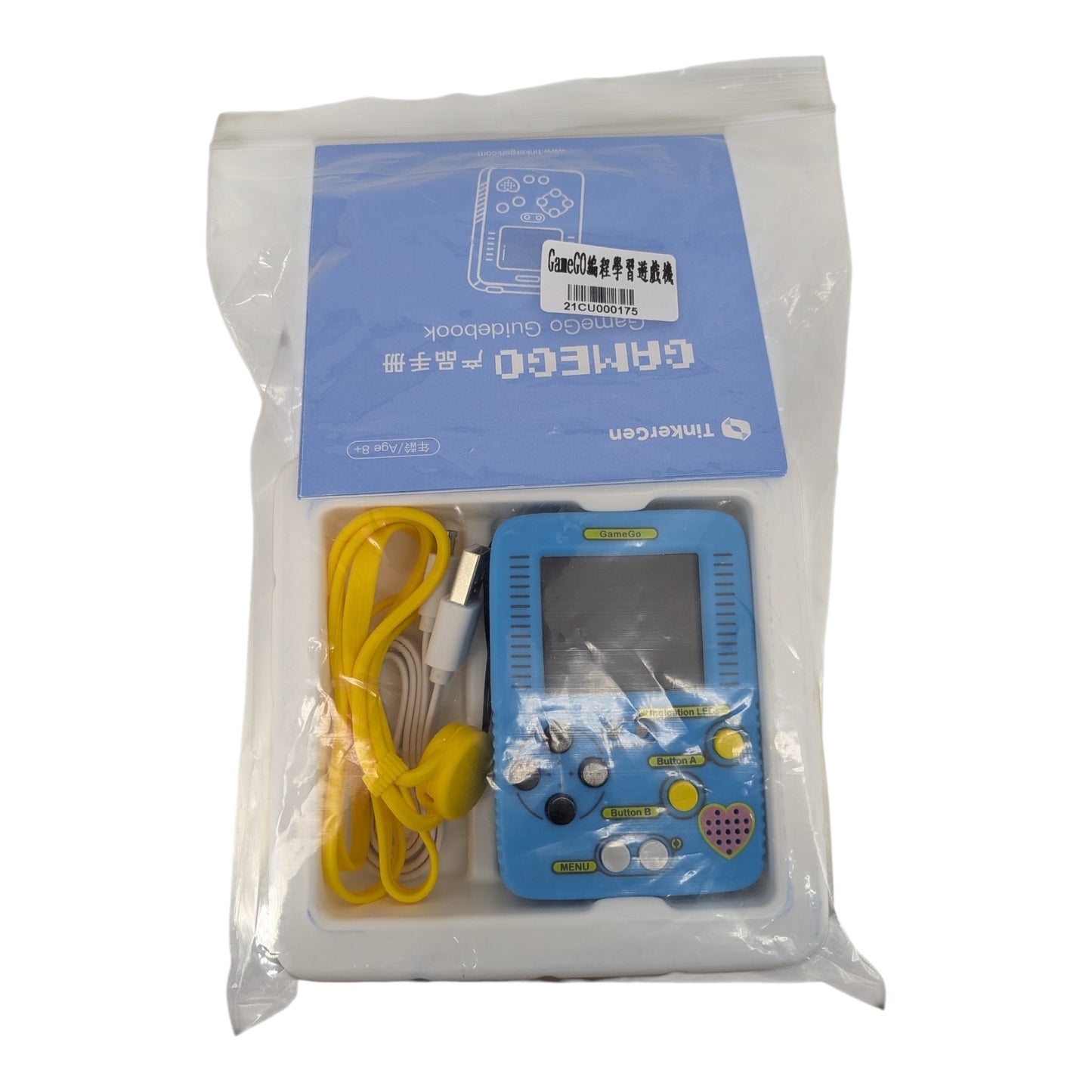
Turn screen time into skill time with theGameGo Programmable Handheld Game Console. Designed for STEM educators and young makers, this pocket-sized device allows users to code their own retro arcade games using Microsoft MakeCode (Block-based or JavaScript). Powered by an STM32F401RET6 ARM Cortex M4 chip and a built-in 400mAh rechargeable battery, it brings digital creations into the physical world. Need help setting up a STEM curriculum?Sun Cheong Computer Co. Ltd.has over 20 years of IT experience. Visit our Sham Shui Po physical store for instant pickup and expert technical advice for your DIY projects!
Key Features
Key Features
- Microsoft MakeCode Compatible: Natively supports MakeCode Arcade for seamless drag-and-drop block programming and JavaScript coding.
- Built-in Rechargeable Battery: Features a 400mAh lithium battery, eliminating the need for disposable batteries and allowing for gaming on the go.
- Powerful ARM Cortex M4 MCU: The STM32F401RET6 chip ensures smooth, lag-free performance for complex, multi-level 8-bit games.
- 10-Lesson Guided Curriculum: Includes a free, structured online course that takes users from absolute beginners to confident game designers.
- Vibrant 1.8" TFT Display: A bright 160x128 color screen brings your custom pixel art, sprites, and game worlds to life.
- Expandable Hardware: Includes a Jacdac port for future hardware expansions, multiplayer connectivity, and advanced DIY maker projects.
Full Product Description
Full Product Description
Learn Coding Through Retro Game Design
Why just play games when you can build them? The TinkerGen GameGo is an innovative educational tool that bridges the gap between software programming and hardware engineering. Designed specifically for STEM education, this handheld console empowers students to design, code, and play their own 8-bit style retro games. Featuring a vibrant 1.8-inch color TFT screen and classic directional pads, it provides a highly engaging, tactile reward for learning complex coding logic.
Seamless Transition from Blocks to JavaScript
Whether you are a complete beginner or an aspiring software developer, GameGo adapts to your skill level. It fully supports Microsoft MakeCode Arcade, a powerful web-based platform. Beginners can start with intuitive, drag-and-drop graphical block programming to understand game loops, variables, and sprites. With a single click, users can transition to real-world JavaScript coding, making it a future-proof educational investment that grows with the student.
Complete 10-Lesson STEM Curriculum Included
You don't need to be a computer science teacher to get started. The GameGo console comes with access to a comprehensive 10-lesson online course. This curriculum guides users step-by-step—from creating a simple moving sprite to developing complex, multi-level games with storytelling elements. It is the perfect self-guided learning tool for kids and a ready-to-use syllabus for classroom educators.
💡 Pro Tip from Our Technicians
"When creating your first game on MakeCode Arcade, always test your code using the on-screen web simulator before downloading the .uf2 file to your GameGo console via the Micro USB cable. This saves time and helps you debug faster! If you are a teacher or parent looking to integrate this into a classroom or home-schooling environment, drop by our Sham Shui Po store. Our team at Sun Cheong Computer Co. Ltd. can provide hands-on technical advice and help you set up bulk STEM kits for your students."
Technical Specifications
Technical Specifications
| Specification | Details |
|---|---|
| Product Name | TinkerGen GameGo |
| Microcontroller (MCU) | STM32F401RET6 ARM Cortex M4 |
| Programming Platform | Microsoft MakeCode Arcade (Blocks & JavaScript) |
| Display | 1.8-inch Color TFT Screen (160 × 128 resolution) |
| Power Supply | Built-in Lithium Battery or 5V Micro USB |
| Battery Capacity | Rechargeable 400mAh (502535) |
| Controls | D-Pad, A/B Buttons, Menu, Reset |
| Educational Content | 10-Lesson Online Course Included |
Delivery Options
Delivery Options
- Local delivery within Hong Kong and in-store pickup.
- Free shipping for orders of HK$400 or above; HK$35 shipping fee for orders below HK$400.
- Shipped by SF Express, usually dispatched the same day for orders confirmed before 6:00 PM (Mon–Sat).
- Estimated delivery time: 1–3 business days after dispatch (Hong Kong).
- In-store pickup details (location and time) will be confirmed by email or phone message.
- Delivery times are estimates and may be affected by weather or unforeseen circumstances.
FAQ Section
FAQ Section
- How do I transfer my MakeCode games to the GameGo console?Transferring games is incredibly simple. Once you finish coding your game on the MakeCode Arcade website, click "Download" to generate a .uf2 file. Connect your GameGo to your computer using the included Micro USB cable, and it will appear as a USB drive. Simply drag and drop the .uf2 file into the GameGo drive, and your game will load instantly!
- Is the GameGo console suitable for beginners with no coding experience?Yes, absolutely! GameGo is designed specifically for beginners. It utilizes Microsoft MakeCode's graphical block programming, which is as easy as snapping puzzle pieces together. Plus, the included 10-lesson online course guides you step-by-step from the very basics to advanced game logic.
- Does the GameGo handheld require external batteries to operate?No, the GameGo features a built-in 400mAh rechargeable lithium battery. You can charge it easily using any standard 5V Micro USB cable connected to a computer or a wall adapter, making it highly portable and eco-friendly.
Target Users / Applications
Target Users / Applications
- STEM Educators & Schools: Deploying interactive coding curriculums in computer science classrooms to teach logic and JavaScript.
- Parents of Tech-Savvy Kids (Ages 8+): Providing a productive, educational alternative to passive video game consumption.
- DIY Makers & Hobbyists: Creating custom retro games, testing pixel art, and experimenting with ARM Cortex M4 hardware.