

SOP16 / SOIC16 IC Test Clip for EEPROM Programming – SOP16 to DIP8/16
SOP16 / SOIC16 IC Test Clip for EEPROM Programming – SOP16 to DIP8/16
Couldn't load pickup availability
Short Product Description
Short Product Description
Stop risking heat damage to your circuit boards. This professional SOP16 Test Clip allows you to program, flash, and read EEPROM/BIOS chips without desoldering. Featuring high-durability gold-plated contacts and wide compatibility (150mil-300mil), it is the essential tool for efficient ECU tuning, motherboard repair, and data recovery using RT809F, TL866CS, and similar programmers.
Key Features
Key Features
- Non-Destructive Repair: Read/Write BIOS and EEPROM chips without desoldering, preserving the integrity of the original PCB pads.
- Dual-Width Support: Universally compatible with both 150mil (Narrow) and 300mil (Wide) SOP16/SOIC16 chip bodies.
- High-Conductivity Probes: Features gold-plated contact needles for superior signal transmission and resistance to oxidation.
- Robust Grip: Strong spring-loaded mechanism ensures the clip stays attached to the legs of the IC during lengthy read/write operations.
- Plug-and-Play Adapter: Includes a PCB adapter board to easily bridge the ribbon cable to your programmer’s ZIF socket.
Full Product Description
Full Product Description
Effortless In-Circuit Programming
Repairing "bricked" devices or updating firmware usually requires a steady hand and a hot air rework station. The SOP16 IC Test Clip changes the game by bridging the connection between your programmer and the target chip directly on the board. This tool is engineered for precision, allowing you to clamp onto 16-pin SOIC/SOP chips instantly.
Universal Compatibility
Whether you are working with narrow (150mil) or wide (300mil) body chips, this clip is designed to handle the 25 Series SPI Flash, 24 Series EEPROM, and other SOP16 form-factor ICs. It pairs seamlessly with popular programmers like the RT809F, TL866CS, and TL866A, converting the SOP16 interface to a standard DIP format for easy insertion.
Durable & Reliable Connection
Cheap clips often fail due to poor contact pressure or oxidation. Our test clip features reinforced springs and thick gold-plated needle probes to ensure a stable, low-resistance connection every time. The 40cm ribbon cable provides ample flexibility to reach chips on crowded motherboards without tension.
Important Technical Note: The "In-Circuit" Reality
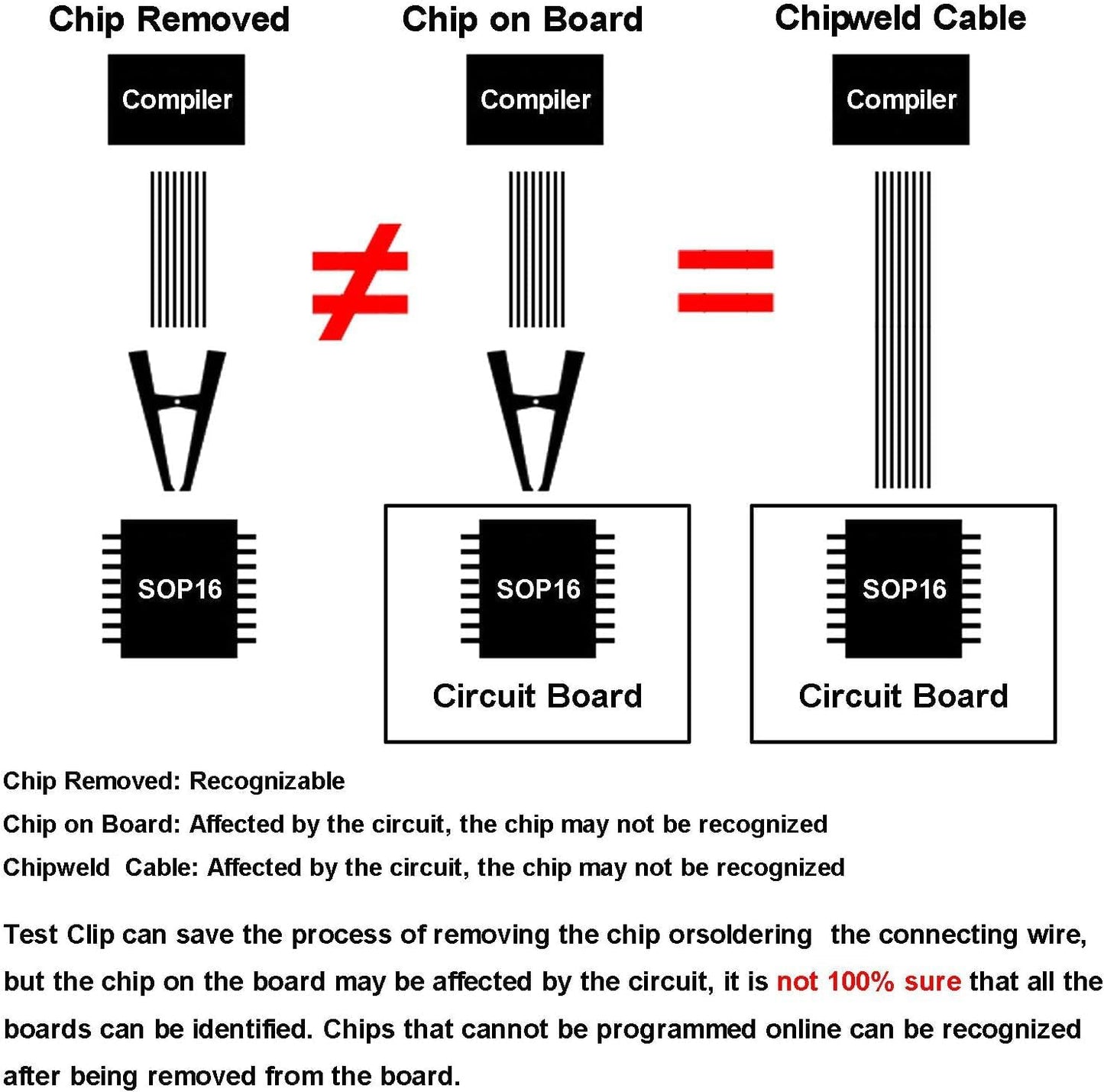
Please Read Before Buying: While this clip enables "in-circuit" programming (ISP), success depends heavily on the target motherboard's design. In some cases, peripheral circuits on the motherboard may interfere with the programmer's signal voltage.
- Scenario A: The clip works perfectly, saving you time.
- Scenario B: Peripheral circuits interfere. In this case, you must desolder the chip and use the clip on the loose chip or use a soldering adapter.
- This is a limitation of physics, not the clip itself.
Technical Specifications
Technical Specifications
- Connector Type: SOP16 / SOIC16 test clip
- Interface: SOP16 to DIP8 / DIP16 adapter board
- Chip Support: 16-pin SOP/SOIC packages (150 mil – 300 mil width)
- Supported Series: 24, 25, 93 series EEPROM / Flash chips
- Cable Length: Approximately 40 cm (flexible ribbon cable)
- Contact Material: Gold-plated copper alloy
- Programmer Compatibility: TL866CS, TL866A, RT809F, CH341A, and other common EEPROM programmers
Delivery Options
Delivery Options
- Local delivery within Hong Kong and in-store pickup.
- Free shipping for orders of HK$400 or above; HK$35 shipping fee for orders below HK$400.
- Shipped by SF Express, usually dispatched the same day for orders confirmed before 6:00 PM (Mon–Sat).
- Estimated delivery time: 1–3 business days after dispatch (Hong Kong).
- In-store pickup details (location and time) will be confirmed by email or phone message.
- Delivery times are estimates and may be affected by weather or unforeseen circumstances.
FAQ Section
FAQ Section
Q: How do I know which pin is Pin 1?
A: Look for the red wire (or the wire with a different color marking) on the ribbon cable. This corresponds to Pin 1. On the clip itself, align the red wire side with the "dot" or beveled edge on your IC chip.
Q: My programmer isn't detecting the chip while using the clip. Is the clip broken?
A: Not necessarily. This is often caused by "peripheral circuit interference." The motherboard components connected to the chip might be draining the power or signal. Try cleaning the chip legs with alcohol first. If it still fails, you will need to desolder the chip to program it off-board.
Q: Can this clip handle 8-pin (SOP8) chips?
A: This specific model is an SOP16 clip. While you technically could align it to use only 8 pins, it is difficult to seat correctly. We recommend purchasing our dedicated SOP8 clip for 8-pin chips for the best stability.
Target Users / Applications
Target Users / Applications
- Electronics Repair Shops: For laptop motherboard BIOS recovery and TV mainboard repair.
- Automotive Technicians: For ECU tuning and instrument cluster EEPROM programming.
- Data Recovery Specialists: Extracting data from storage chips on damaged boards.
- Hobbyists & Makers: Firmware updates for microcontrollers.