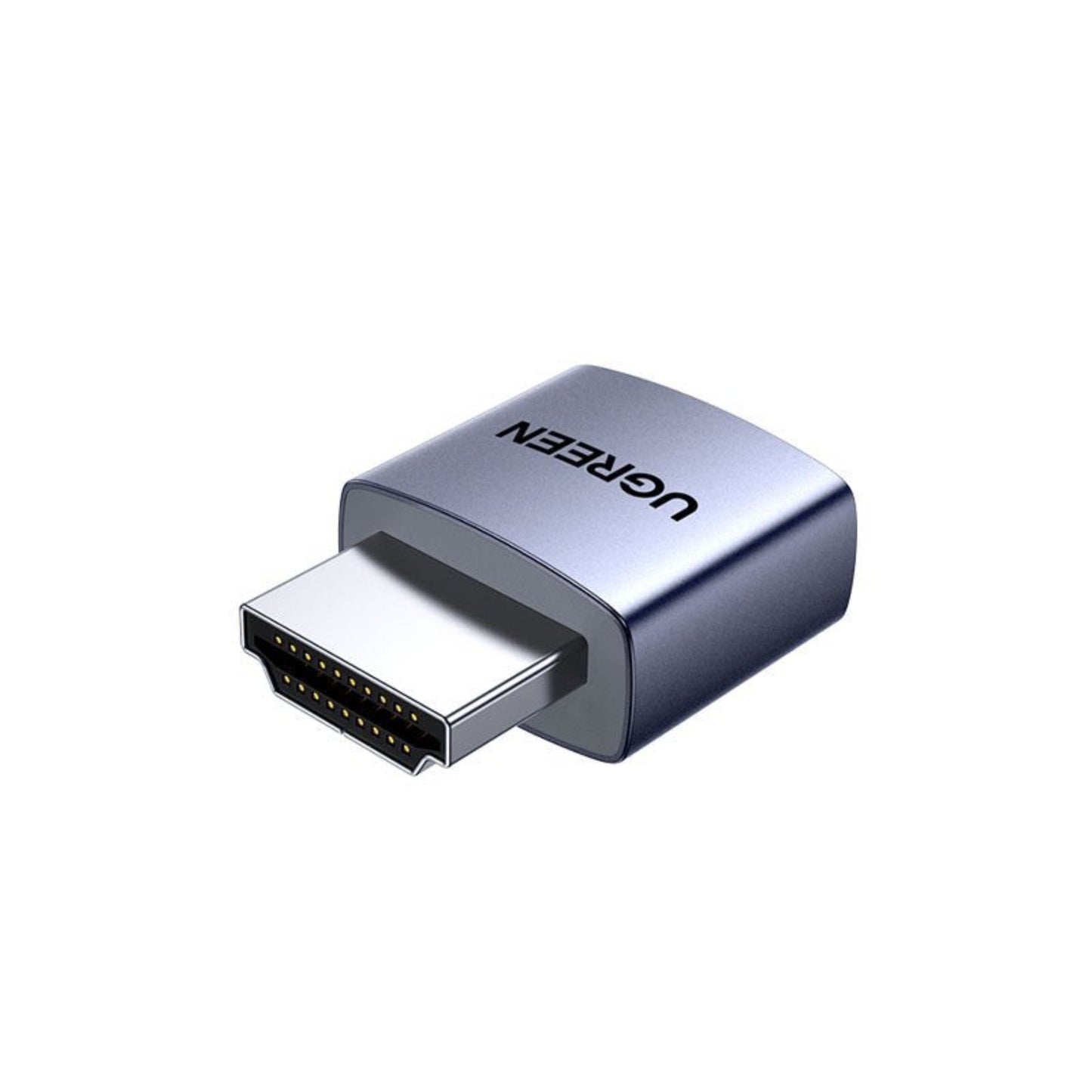


UGREEN CM775 4K HDMI Dummy Plug | Virtual Display Emulator
UGREEN CM775 4K HDMI Dummy Plug | Virtual Display Emulator
Couldn't load pickup availability
Short Product Description
Short Product Description
Unlock high-resolution remote desktop access with the UGREEN CM775 4K HDMI Dummy Plug. Designed for headless servers, cryptocurrency mining rigs, and remote workstations, this virtual display emulator tricks your GPU into thinking a 4K monitor is connected. Enjoy crystal-clear 4K@60Hz (4:2:0) resolution without the need for drivers or external power. Stop dealing with 800x600 locked screens on TeamViewer or AnyDesk! Need it today for your server rack? This essential adapter is in-stock at Sun Cheong Computer Co. Ltd.—visit our Sham Shui Po physical store for instant pickup
Key Features
Key Features
- Hardware Acceleration Enabler: Tricks your GPU into activating, ensuring smooth, lag-free performance for remote desktop applications.
- 4K@60Hz Virtual Display: Simulates a high-resolution monitor up to 4K (4:2:0), giving you a massive, crisp remote workspace.
- 100% Plug-and-Play: Requires zero drivers, software installation, or external power—just plug it into an HDMI port.
- Universal OS Compatibility: Works flawlessly out of the box with Windows, macOS, Linux, and specialized mining operating systems.
- Premium Aluminum Shell: The high-quality metal casing ensures excellent heat dissipation and long-lasting durability in hot server environments.
- Multi-Screen Simulation: Perfect for creating a virtual second screen to cast to devices like Chromecast or OBS Studio.
Full Product Description
Full Product Description
The Ultimate Solution for Headless Systems
Managing a computer without a physical monitor (a "headless" setup) often leads to frustrating software limitations. Operating systems and remote desktop applications (like AnyDesk, TeamViewer, or Chrome Remote Desktop) will default to a low, unchangeable resolution—or disable GPU hardware acceleration entirely—if they don't detect a connected screen. The UGREEN CM775 HDMI Dummy Plug instantly solves this by simulating a high-definition display, allowing you to access your remote machine in full 4K glory.
Crystal-Clear 4K@60Hz Resolution
Don't compromise on visual quality when working remotely. This premium virtual display emulator supports resolutions up to 4K@60Hz (4:2:0), providing a massive digital workspace for remote video editing, stock trading, or managing complex server dashboards. It is fully backward compatible with 1080p and 1440p, ensuring smooth performance across all network bandwidths.
Premium Aluminum Build & Plug-and-Play
Built for continuous 24/7 operation, the UGREEN CM775 features a durable aluminum alloy shell that effectively dissipates heat from your GPU's exhaust. It requires absolutely no drivers, software, or external power. Simply plug it into any available HDMI port on your Windows, macOS, or Linux machine, and your system will instantly recognize it as a connected monitor.
💡 Pro Tip from Our Technicians
"If you are using a Mac Mini as a home server or a Windows PC for remote video rendering, you've likely noticed that the remote desktop interface feels incredibly laggy and is stuck at a low resolution. This happens because the OS disables the GPU when no monitor is detected! By plugging in this UGREEN HDMI Dummy Plug, you force the system to activate hardware acceleration. Your remote sessions will instantly become buttery smooth. Need this fix right now? Drop by our Sham Shui Po store! Our team at Sun Cheong Computer Co. Ltd. always keeps these in stock for instant pickup."
Technical Specifications
Technical Specifications
| Specification | Details |
|---|---|
| Brand | UGREEN |
| Model Number | CM775-55439 |
| Product Type | HDMI Dummy Plug / Virtual Display Emulator |
| Max Resolution Support | Up to 4K @ 60Hz (4:2:0) Backward compatible with 1080p/1440p |
| Interface | Standard HDMI (Male) |
| Shell Material | Premium Aluminum Alloy |
| Supported Operating Systems | Windows, macOS, Linux |
| Installation | Plug-and-play (Driver-free, no external power) |
Delivery Options
Delivery Options
- Local delivery within Hong Kong and in-store pickup.
- Free shipping for orders of HK$400 or above; HK$35 shipping fee for orders below HK$400.
- Shipped by SF Express, usually dispatched the same day for orders confirmed before 6:00 PM (Mon–Sat).
- Estimated delivery time: 1–3 business days after dispatch (Hong Kong).
- In-store pickup details (location and time) will be confirmed by email or phone message.
- Delivery times are estimates and may be affected by weather or unforeseen circumstances.
FAQ Section
FAQ Section
- Why is my remote desktop resolution locked at 800x600?When a computer boots up without a physical monitor connected, the graphics card (GPU) often disables itself to save power, locking the system to a default, low-resolution display. Plugging in this HDMI Dummy Plug tricks the GPU into thinking a 4K monitor is attached, unlocking high resolutions and hardware acceleration for your remote sessions.
- Does this HDMI emulator require any software or drivers to work on a Mac Mini?No, it is completely hardware-based. Whether you are using a Mac Mini, a Windows PC, or a Linux server, the operating system will instantly recognize the UGREEN CM775 as a standard external monitor without any driver installation.
- Can I use this to keep my GPU active for cryptocurrency mining?Yes. Many mining operating systems and specific mining algorithms require a display to be connected for the GPU to operate at its maximum hash rate. This dummy plug is the perfect, low-cost solution to keep your mining rigs running efficiently without buying actual monitors.
Target Users / Applications
Target Users / Applications
- Home Lab & Server Admins: Managing headless NAS setups, Proxmox servers, or Mac Minis remotely via AnyDesk or TeamViewer.
- Remote Video Editors: Forcing GPU hardware acceleration on remote rendering machines to ensure smooth video playback over the network.
- Cryptocurrency Miners: Keeping GPUs active and preventing hash rate drops on multi-GPU mining rigs.
- Streamers & Broadcasters: Creating a virtual secondary display to capture and cast specific windows via OBS or Chromecast.